Customer Insights - Journeys ·
Pin the receipt to the order
Customer Insights - Journeys keeps every form submission and every consent, and nothing that connects the two. How a small log table answers "when, and through which submission" in one row, and why the flow only writes it after the click.
Ingredients
- Double opt-in already running on your forms. The log records confirmations, so without them there is nothing to write.
- A test address whose inbox you can read. Every row in this log needs a real click on a real confirmation mail, and none of it can be tested without one.
- One written definition of the remark text every form sends. The flow parses it, and an undocumented format breaks the first time someone edits a form script.
- A decision on who owns the log rows, made before the first deployment. The owner needs read access to them, and that is the step that gets forgotten.
A busy till keeps every receipt. They go into one drawer in the order they were printed, and none of them says which table it belongs to. When a guest comes back a week later and asks what they ordered, the receipt is in there somewhere. Finding it is a different job.
I ran into the same drawer while testing the double opt-in from the previous article. My test address had been through the forms for weeks: signed up, unsubscribed, signed up again, from the webshop, from the profile page, from the website. I wanted to answer one question about one newsletter: when did this address confirm it, and through which form? The consent row said Opted In and showed a modified date. The list of submissions for the address scrolled.
I was not worried. Every submission is stored, with every value it carried. The proof was in Dataverse, so an audit was one query away.
1. Every submission stored, none linked to its consent
It was not one query away. Customer Insights - Journeys stores the current consent state per email address, and it stores every form submission. It does not store which submission produced which consent.
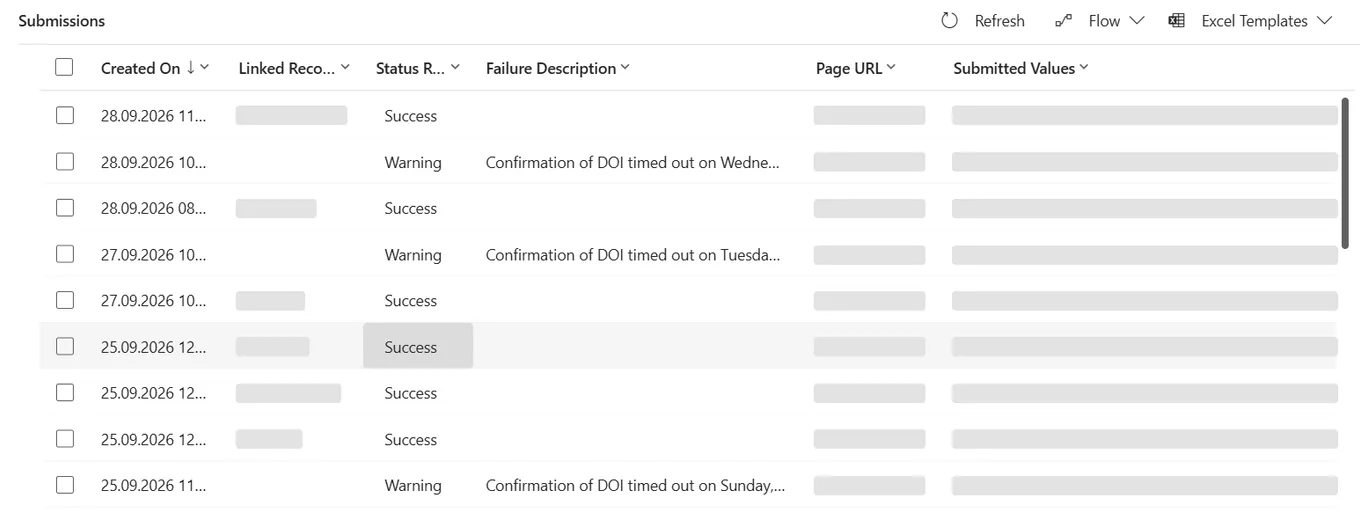
The consent row carries a state and a date. The submission carries the consent values the customer ticked, but with double opt-in those are a request. They become consent when the customer clicks the link in the confirmation mail, and which of the many submissions led to that click is recorded nowhere. You can reconstruct it by lining up timestamps and statuses by hand, for one address, if nobody is waiting for the answer.
The regulation asks for more than a state. GDPR Article 7(1):
Where processing is based on consent, the controller shall be able to demonstrate that the data subject has consented to processing of his or her personal data.
Demonstrate means that someone other than the person who built the system finds the answer, without asking that person. So we built the order number ourselves.
2. One row per confirmed purpose or topic
The log is a plain custom table. One row per purpose or topic a customer confirmed, created once and never updated. Names below are generic, the shape is the real one.
| Column | Type | Holds |
|---|---|---|
new_name | Text, primary | Source and segment, readable in a list |
new_type | Choice | Purpose row or topic row |
new_purposeid | Lookup to Purpose | Set on purpose rows |
new_topicid | Lookup to Topic | Set on topic rows |
new_contactid | Lookup to Contact | Who held the address at the time |
new_email | Text | The address that confirmed |
new_formsubmissionid | Lookup to Marketing form submission | The receipt |
new_source | Text | Which form family, for example the webshop signup |
There is no timestamp column. The row is created after the click, so createdon is the confirmation time, give or take one flow run.
The email address sits on every row as text, next to the contact lookup, because consent in CIJ belongs to the address. The double opt-in documentation defines a new customer as one with no contact point consent “for this customer’s email address”. We watched what that means in a test: after an address was changed and changed back, each consent stayed on the address that had confirmed it, and the contact moved on without them. A log keyed only on the contact would have lost track of exactly the rows it exists to keep.
3. The first version watched the contact
The first version of the flow was the one most people would build first. It triggered when a text field on the contact changed, waited a fixed minute for the platform to catch up, then searched for the newest submission with that email address and a successful status. Top one, no time window.
In testing that holds, because a tester sends one form at a time. A customer who submits twice, or a profile page that saves while a signup is still processing, hands the search two candidates and nothing to tell them apart. The flow would pick one, link it and report success.
4. Mark the submissions that wait for a click
The replacement starts from the submission itself. It triggers on updates of the marketing form submission, filtered to the status column, with no filter on the form, so every form is covered without being listed.
The status alone is not enough. The trigger delivers the new status and nothing about the old one, and successful looks the same whether the customer clicked a confirmation link or the form never asked for one. Reading the double opt-in setting does not settle it either: a compliance profile can send the confirmation mail only to new customers, so the same form produces confirmed and unconfirmed successes side by side. A successful status tells you the submission was processed, not that anybody clicked.
So the flow leaves itself a mark. When a submission enters the status that waits for confirmation, the flow writes a timestamp into a custom column on that submission. When the same submission later turns successful, the mark proves a click happened in between.
- customer → formsubmits a signup
- platformsets status to confirmation pending, sends the mail
- flow → submissionwrites the pending stamp
- the confirmation link stays valid for 28 days
- customerclicks the confirmation link
- platformsets status to successful
- flow → logstamp present: one row per purpose and topic
- successful without a stamp: nobody confirmed anything, nothing is logged
In our environment the three statuses are 575440004 for confirmation pending, 575440002 for successful and 575440005 for failed after confirmation. Check yours before copying them, they are not on any documentation page I could find.
Writing the stamp updates the row the flow triggers on, which is the classic setup for a flow that fires itself forever. The trigger only listens to the status column, so the stamp should pass unnoticed. We did not take that on faith: in a sandbox, over thirteen runs, the stamp went in and the trigger stayed quiet for the 130 seconds we watched.
Two more guards sit in front of the write. If a log row already exists for the submission, the flow stops, so a retried run cannot log a confirmation twice. If the submission resolved to a lead instead of a contact, it stops as well. A submission that fails after the stamp goes to the monitoring flow: a customer confirmed, and we could not record it.
5. A remark field says what was confirmed
The submission now knows that it was confirmed. What it was confirmed for, it does not say in a form the flow can use. Every form therefore writes one extra hidden field, a plain text remark in a fixed format:
Webshop signup | Purpose PurposeID 11111111-1111-1111-1111-111111111111 |Topic TopicID 22222222-2222-2222-2222-222222222222 |The first segment is the source, every further segment is one purpose or one topic. This is a different string from the P=…|T=… key in the previous article. That one is the wish list the confirmation flow compares against existing consent. This one is the text on the receipt.
The flow reads the remark from the field submission and takes it apart, simplified:
source    first(split(remark, ' |'))
segments  skip(split(remark, ' |'), 1), filtered to non-empty items
id        last(split(item(), ' '))
type      if(contains(item(), 'PurposeID'), 'purpose', 'topic')
It is a textual contract, and it breaks like one. If somebody renames PurposeID in a single form script, the flow tries to file a purpose as a topic and the create fails. The format is now written down next to the flow, and every script that writes the remark points to that page.
6. Who can read the receipts
On 25 September the flow failed at the create step:
Read Privilege Check For Owner failed with exception: Principal team (… teamType=0 …)
is missing prvReadnew_doilog privilege … for entity 'new_doilog'
(LocalizedName='DOI Logs')
TargetPrincipalLacksReadPrivilege
The log rows are owned by the business unit’s default team, and as the message says, Dataverse checks whether the owner can read a row before it hands the row over. Nobody had given that team anything on a table that did not exist when its roles were set up. A role with basic read on the log, assigned to the default team of each business unit, fixed it.
People hit the same wall one step later. The log sits on the contact form as a read-only subgrid, so support and the data protection side can see the trail without leaving the record. A user with only the standard marketing roles, Marketing Manager at business unit level for example, does not see it properly, because a new custom table is not part of those roles, and the predefined roles cannot be edited. We copied the marketing role, added read on the log table to the copy and assigned the copy instead.
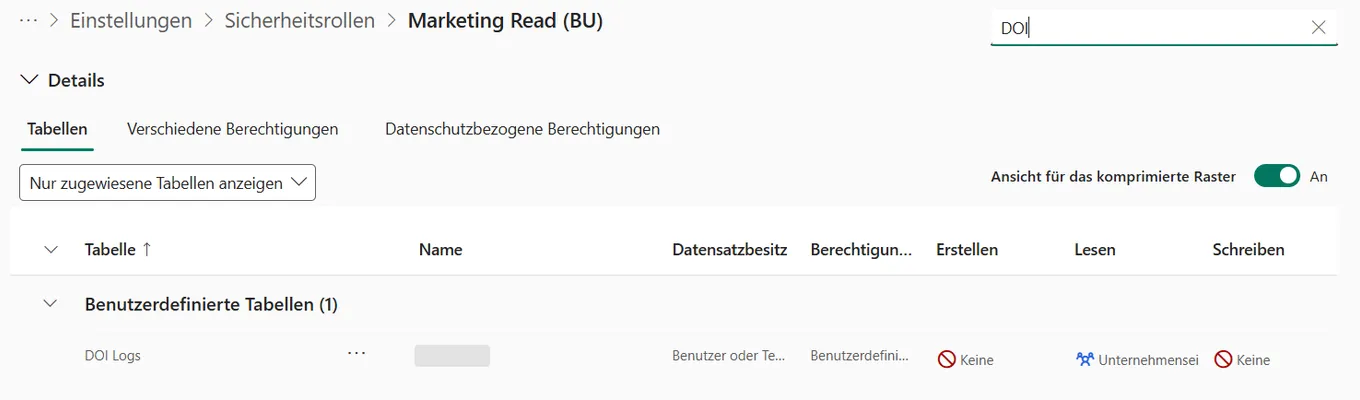
Check the roles of the people who will open the contact, not your own: as a system administrator you see everything, which is exactly why you will not notice.

When someone asks about one newsletter now, the receipt is pinned to the order.
The recipe card
- CIJ keeps the consent and the submission. The link between them is yours to store.
- Stamp a submission when it starts waiting for confirmation, and log only successes that carry the stamp.
- Record the address on every row. The contact can change, the consent stays where it was given.
- Open the log with the roles of the people who will read it, before they do.
At the table
Loading comments…