Customer Insights - Journeys ·
What nobody tells you about the marketing form editor
Field notes from embedding real-time marketing forms into a system we did not own: stale data sources, the string undefined, event timing, and why there is no undo.
Ingredients
- Access to the embedding page, not just the form. Half the bugs live on the host side.
- A named contact on the team that owns that page. Better to know it before something is on fire.
- Browser devtools open, always. This form does most of its lying visually.
- A copy of the live form HTML, saved outside the editor. There is no version history, so this is your only way back.
The form editor in Customer Insights Journeys is sold to you like a boxed cake mix. Add water, stir, bake. For a simple newsletter signup that promise holds up fine.
Then you embed the same form into an external system, prefill it from an API, and write the result back — and you are cooking in somebody else’s kitchen, with unlabelled jars and a stove that heats on its own schedule. Here is what we scorched. Every project detail is a placeholder; every mistake is one we made.
Know your ingredients
A real-time marketing form is not a component, it is a chunk of HTML that a loader script hydrates at runtime. Everything the editor gives you ends up as div elements carrying data-* attributes. So you can do all of it with plain DOM work, and you get no contract in return: the attributes are the contract, and their values sometimes surprise you.
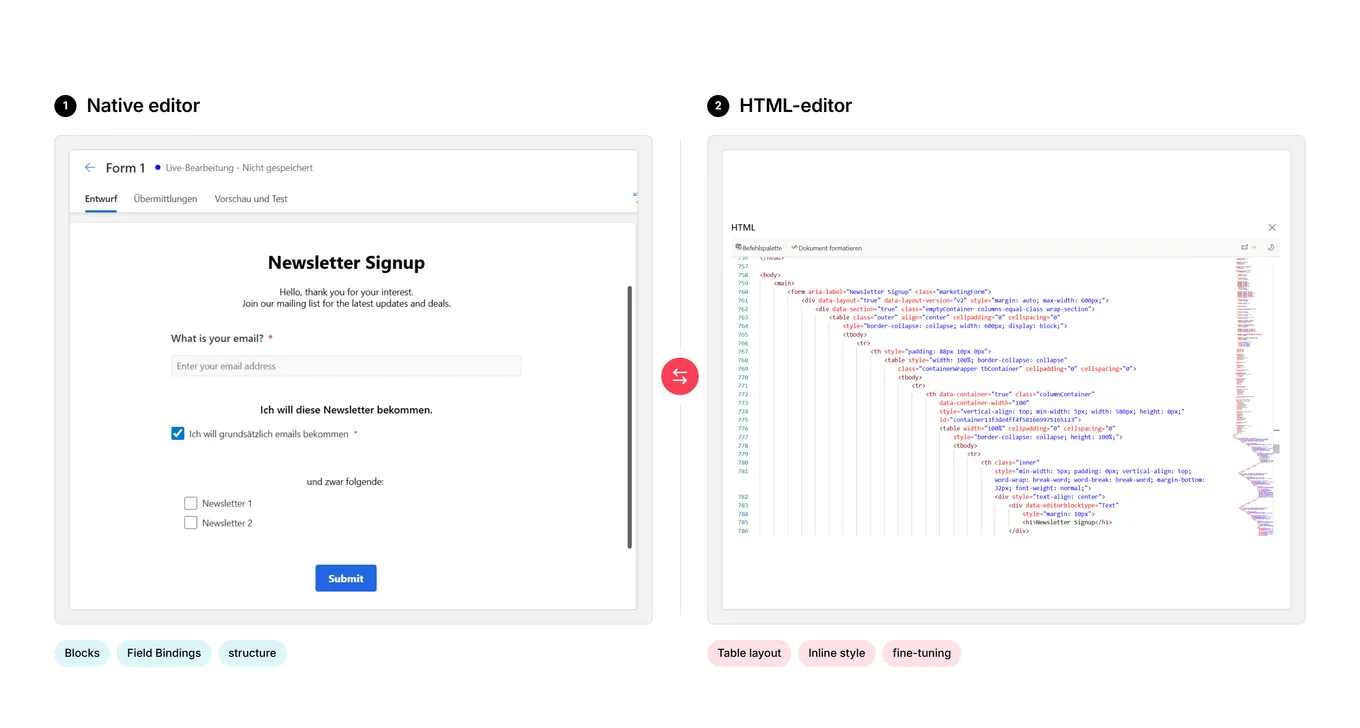
Prep separately, and pass the seasoning in
The first instinct is to paste your logic inline into the form. That works the way chopping vegetables directly into a hot pan works, and it is why you end up with twelve copies of one script quietly drifting apart. Reference an external stylesheet and script from the form’s <head> instead — and note that editor-generated blocks carry inline style attributes that beat any external selector, so remove the inline style rather than drowning it in !important.
Configuration does not belong in the external file either. Pass it in from the form through a data-* attribute on a config div, and one script can serve every form. This is the highest-leverage change on the list, and the only realistic way to get any of it under version control.
Check the fridge, not yesterday’s prep list
This bug cost us the most, and it generalises to any form embedded in a system you do not own.
The host renders a container div server-side, writing what it knows about the visitor into data-* attributes. Inside sits the form element, whose attributes come from the createForm() call and are rewritten on every build. The customer email appears on both — same value, two very different mechanisms for staying current.
host container
data-host-email = customer@example.comWritten by the server, once. Never updated again.
the form element
mailid = customer@example.comWritten by createForm, on every single build.
We read the container, because both values we needed sat there together. For an existing customer both copies are populated, so it worked — for months.
Then came the new-registration flow. There is no customer at page render, so the container attribute stays empty. The visitor types their address, the host rebuilds the form with it, our script runs again, reads the container it always read, and finds it still empty. No client-side rebuild touches a server-rendered attribute.
The rest is consequence: the hidden required email field stays empty, validation refuses to submit, and the browser complains it cannot focus an invalid control — because the control is hidden. Nothing in that error mentions email addresses. The fix is one line, event.target.getAttribute('mailid').
But the fix is not the point. Some values a host exposes are a contract. Others are internals that happen to be readable. The createForm() parameters are a contract. The container attributes never were. We read the internals because they were convenient, and in the flow we tested first, they were correct.
The jar labelled salt that contains sugar
Consent blocks come in two flavours, purpose and topic, so matching logic has to branch on which one it holds. The obvious implementation checks whether data-topicid is set — and the editor generates purpose blocks with data-topicid="undefined". Not a missing attribute, not an empty string. The literal nine-character string, sitting in the jar with a confident label on it.

So every purpose block takes the topic branch, compares "undefined" against a real ID, and matches nothing. Purpose-level consents were never prefilled while topic-level ones worked fine, which made it look like a data problem. Treat the string as a sentinel and classify both sides:
const blockIsTopic = topicId && topicId !== 'undefined';
const entryHasTopic = entry.T && entry.T !== '';

let match = false;
if (blockIsTopic && entryHasTopic) match = topicId === entry.T;
else if (!blockIsTopic && !entryHasTopic) match = purposeId === entry.P;
Note the deliberate absence of a cross-comparison. A topic block must never match a purpose-level entry — getting sloppy there produces consent records that claim more than the customer agreed to.
Plating is not cooking
Setting a property updates the DOM. It does not tell the platform anything happened: you have arranged the plate beautifully and told nobody in the kitchen. The loader tracks state through events, so the visible checkbox and the submitted payload quietly disagree. Treat “assign, then dispatch input and change with bubbles: true” as one indivisible step.
Two timing notes on top. d365mkt-afterformload fires again every time the host rebuilds the form, so anything in it must survive being tasted twice without doubling the salt. And a purpose’s accepted state is not processed synchronously with your dispatched event: tick a purpose and its topics in one pass, and the topic writes land while the purpose still counts as unaccepted, so the next render discards them. Purposes first, topics after a setTimeout — you added the eggs before the butter and sugar had come together.
The transferable part is the diagnosis: when your logic is provably correct but the UI disagrees, stop re-reading the comparison and start asking about timing. Log the value right after the write and again 500 ms later. First true, then false, means something downstream is reverting you.
Do not build the recipe around one specific pan
The editor appends timestamps to generated element IDs, so document.getElementById("email") finds nothing and throws. Ours sat at the end of the listener, so everything above it still ran and the form looked fine — the only casualty was the feature that line existed to enable. Prefer input[id^='emailaddress1'], and guard every lookup.
The consent payload wants the same treatment for the opposite reason. A visitor with no history comes back as an empty {} or [], not as null — both are truthy, so the check passes, the loop runs zero times, and nothing is prefilled. That is indistinguishable from a prefill that ran and matched nothing. Test the length, not the existence, or the one case you cannot debug is a brand new contact.
Related: hidden is not unchecked. Hidden required fields still fail validation, and ticking a hidden box gives no visual feedback — we spent real time convinced a hidden purpose was not being prefilled when it had been set correctly all along.
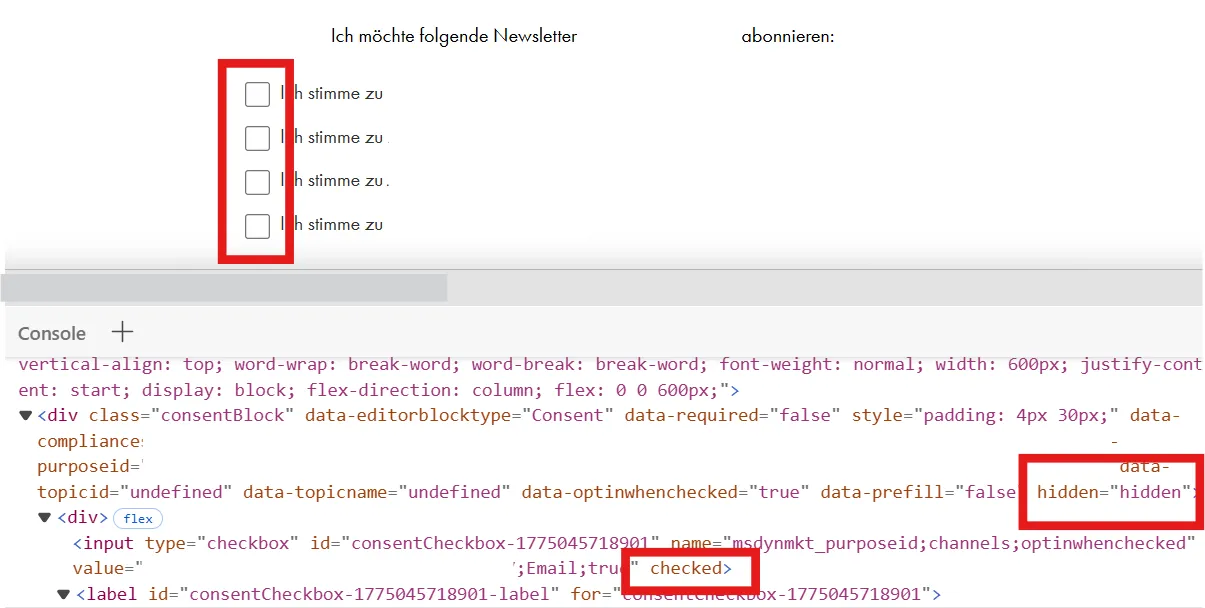
Nobody is keeping a kitchen log
Every pitfall above is a detail you learn once. This one is structural, and it is what I would fix first if I started over.
There is no version history for form HTML. No diff, no blame, no rollback. Worse, the editor is right there, the change is always small, and nothing stops you making it in production. There is no boundary, and we did not always resist it.
Move the logic into one external versioned file so it rolls back by deployment, turn on auditing for the form table, and export every live form through the API on a schedule. That last one is not backup — it is that a commit nobody authored means somebody edited production directly.
The recipe card
- Know your ingredients. Never trust the type of what you read out of an attribute.
data-topicid="undefined"is a string, and it is lying to you. - Check the fridge, not the prep list. Agree which host values are a contract and which are internals. The wrong source is correct right up until the one flow where it is not.
- Tell the kitchen, then let it rest. Setting a property is not notifying the platform, and purposes have to settle before topics. When correct logic gives a wrong result, suspect timing.
- Write down what you cooked. Externalise the logic today. The editor gives you no history, no rollback and no boundary.
None of this is in the drag-and-drop tour. All of it is waiting the first time you cook for actual guests.
At the table
Loading comments…